Lessons

Sunday, March 26, 2017

Communicate 1 - Communication Guidelines

Communication Plan for Online Instructing


Below is a sample plan for ensuring effective communication with students, parents, and administrators while facilitating a virtual course. Next, is a sample welcome letter that I found and edited, which could be emailed to students and parents.

1. Compose a Welcome Email that includes, the course title, my expectations, suggested readings, and required materials, such as a calculator.
a. A personal welcome message
b. Date and time of the synchronous Welcome Session
c. Instructions concerning course access and signing into the LMS
d. Personal notes when providing feedback

2. Instructions on how to access the Course Syllabus
a. Provide my contact info, to include phone and email; I will use Remind.com, so give
  students and parents, the class code to voluntarily subscribe to course
  announcements.
b. Make a personal welcome phone call to all students enrolled, and speak with parents
if possible.

3. Verify contact information, including emails, cellular, and home numbers for accuracy.
a. Address any questions and document contacts for future reference such as parent
conference.
      b. Save all information
      c. Copy admin team on student concerns, parent issues, or any policy violations


Click here to view Welcome Letter


Communicate 1 - Identify Stakeholders


Communicate 1 - Communication Laws

How can one refrain from violating FERPA and TCPA guidelines in online communication? What methods could be employed to verify that copyright is not being violated? Does copyright require that all work, images, words, and graphics must be original?


In order to avoid violating FERPA and TCPA guidelines in online communication, I will be sure not to send student grades or other pertinent information in emails. Instead, make sure that parents and students have the appropriate log-in credentials to access the information needed. 

There are several online tools available to verify that copyright is not being violated.  In this module, TurnitIn was highlighted as a great way to check for plagiarism.  There are other sites as well, such as Grammarly that checks for plagiarism. 

Copyright can be a complicated and confusing law to understand and apply.  This video, Copyright Basics explains several of the rules.  Among those, I learned that government created resources are not covered by copyright law. Neither are resources where copyright has expired.  Fair use allows for certain amounts of work not to be original and includes use for commentary, parody, news reporting, scholarly research, and education. 

Communicate 1 - Communication Definitions

Consider Turkle’s perspective while viewing the video, Connected: But Alone?

How have your individual communication skills changed as with the innovations in technology? How have advancements in technology altered classroom communication? Will these change further?

With innovations in technlogy, my individual communication skills have changed immensely.  As a teacher of middle school students, I have had to adapt to the change that students' idea of listening has changed as well.  For example, students do not have the same attention span as they once did. Due to their use of technology at such an early age, students are stimulated by the use of technology and expect to have that same stimulation in the classroom.  More and more, we find that students are disconnected emotionally, but they are connected with technology. So, as a teacher, I have had to change my view of being connected with my students to communicating in social media setting like email or Edmodo, an LMS. Advancement in technology has also altered classroom communication, for the better in my opinion. Now, students are able to view recordings of just about any topic online when they need extra help. Additionally, technology has made it more convenient for students to turn in work at different times that fit with their busy schedules. In the future, I believe we will see more options for online and virtual experiences in the face-to-face classroom, allowing for more flexibility. However, as Shery Turkle stated, it is important that we not lose the emotional connections between students, teachers, parents, and the community.   


Saturday, March 25, 2017

Navigate Reflection

iNacol, the International Association for Online Learning, publishes Standards for Quality Online Teaching.

Click the following standards to see examples completed during the module:

Standard B: The online teacher understands and is able to use a range of technologies, both existing and emerging, that effectively support student learning and engagement in the online environment.

Standard I: The online teacher demonstrates competency in using data from assessments and other data sources to modify content and to guide student learning.


Standard K: The online teacher arranges media and content that helps students and teachers transfer knowledge most effectively in the online environment. 

Answer in a complete paragraph response: How has the Navigate module prepared you to meet each standard listed above? Link to or provide specific examples from your work in Navigate. What strategies will you take away from the Participate module and apply to your teaching? What lessons were most beneficial for you?

The Navigate module has prepared me to meet the standards listed by having me explore the in's and out's of Learning Management Systems. I now know how to effectively choose the best LMS to fit the needs of my students and me. I also have a working knowledge of the LMS components, such as blogs, quizzes, content, discussions, etc. I have an understanding of synchronous and asynchronous class meetings and know that both are important for virtual teaching and learning. The most valuable strategy I took away from this module is to vary my delivery with students.  Offer a variety of technological tools for students to use and choose those that allow me to give students feedback. The lessons that were most beneficial to me were those pertaining to online delivery methods. 

Navigate 3 - Course Creation within LMS

Image result for canvas lms
During this exploration with different LMS's to create a course, I finally chose Canvas. I began to download Moodle, which was the most involved download that I have encountered in a while. Needless to say, I abandoned that one and went to Canvas.  Canvas was relatively easy to navigate but I didn't see how to recreate the assignment as it was displayed in the tool module.  So then, I decided to try out Blackboard so I would have a comparison.  But, I couldn't get to an area where I could do a single sign on, not being with an institution.  

The tools Canvas uses are courses, calendar, dashboard, inbox, content, uploads, and conferences. After the content uploaded I was prompted by Canvas to invite students to the course I created, 8th Grade Algebra I.  There shareable links to the course as well as a place to provide emails.  I was also shown a "Quick Setup Guide".  Canvas is very user-friendly.  The onsite tutor guides you through step by step with having all components ready before you publish a class. 

Navigate 3 - LMS Reporting

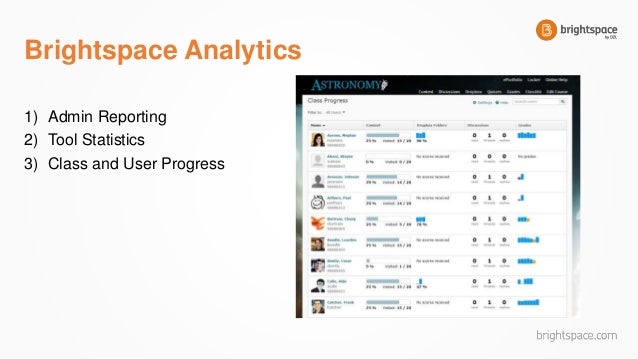
Image result for brightspace lms reporting..

Brightspace was the LMS that I reviewed in this module.  There are several options and levels for grade reporting:


Student Level – Student data can result in a report view that indicates the number of times a student accesses a course, attempts a quiz, visited content, or used a particular tool. The reports can aggregate across students in a course, and this data can be informative about the effectiveness of the online course.


Teacher Level – A report may look at course grades per course offering or across semesters/sessions to indicate positive or negative results per teacher, as well as overall material within the course’s effectiveness. A teacher may look at their own data or their students’ data for differentiation or evaluation of their teaching methods.


Course Level – Course level analytics are helpful to evaluate and re-design course materials and assessments.

Program Level – Program level data is used to evaluate the effectiveness in aggregate of the successes and failures of programs to inform administrators of areas for improvement.
(GV Tool) 

In regard to student performance, the teacher level is most valuable for the online instructor. The statistics on quizzes and tests, for example, will provide me with strengths and weaknesses of my students so I am able to provide the appropriate feedback, remediation, or enrichment. 

Navigate 3- LMS Tool Categories

What are the most relevant features offered within an LMS?  

Which features directly relate to effective online instruction?  How might you use these features in the online classroom environment?

Image result for lms tools

There are several common tools found in a number of LMS's. These tools include email, notification system, discussions, instant messaging, blogs, social profiles, calendar, and alert systems. Of the tools listed, I believe that the discussion board  is most directly related to effective online instruction. Using this tool an instructor can give feedback in a synchronous setting and also learn what students understand when posting their discussions. The calendar is also a useful tool in an LMS. I could see using the feature in an online classroom environment to make sure students are aware when quizzes and tests are as well  get notifications for turning in assignments. 


Friday, March 24, 2017

Navigate 2 - LMS Trends

Research trends in digital learning and select the trend that will make the most impact on digital learning over the next five years. Which trend did you select? How do you foresee this trend impacting online learning?  Will this trend be a learning fad or will it become an essential part of online learning in the future? 


After examining the growing trends and their impact on education, I am convinced that virtual education is here to stay and attributes are spreading in brick and mortar settings as well.  Accoring to the infographic the 3 top ranking the following as the top Educational Trends:
1. Web-based tools for education
2. Online Educational Resources
3. Digital Literacy

The the top ranking areas are those were higher skill and higher level of learning takes place.  This shows that educators are thinking how they can maximize student learning by using virtual tools to keep an enormous amount of information available to their students. Virtual learning environments are here to stay.  As well, we will see all text books in schools in digital forms, which will allow more blended learning. 

Navigate 2 - Tools for Deciding on an LMS

Which LMS is best? How does the selected LMS meet the needs of all stakeholders, including administrators, students, teachers and faculty, instructional technology, development, support, and parents? How does the selected LMS align with the initiatives, growth, and technological needs of your organization?
After researching and experimenting with a few LMS's, I chose Edmodo as the one best to fit my needs as an online instructor.
Some reasons it is most popular are: 
  1. It’s free.
  2. It provides a secure environment.+++
  3. It is user-friendly.
  4. It has awesome features.You can post text, polls, videos, links, quizzes, etc.
  5. It helps with going paperless.
  6. It’s mobile friendly.
  7. It helps with differentiation.
The Top 20 Most Popular LMS Software Solutions

Navigate 2: Roles: Learning Management System and Student Information System

                           The info-graphic below outlines the various roles in a                                     Learning Management System (LMS). 


Navigate Roles Matrix

Navigate 1 - Screen Capture

The screen capture function allows teachers to record videos for instruction or remediation and archive these videos so students may access the at anytime. The use of this tool modifies teaching methods by making it possible to differentiate instruction for a large group of students. In the screen cast below, I a reviewing how to graph a liner equation written in slope intercept form. Students are able to pause and/or rewind as needed until they have an understanding of the concept.

Navigate 1 - Synchronous Vendor Market

Select one of the synchronous vendor applications listed in this lesson. Try-out the application.  
Think about how you would use this application 
to host a live lesson with students.


I enjoyed learning the features of this open platform BigBlueButton, As an instructor, I am able to upload any Microsoft Office document or PDF and share in the platform.  Also, I can make any student a presenter, which then their mouse is highlighted as they move around the document. We can also voice conference and share my desktop with the students.  

Navigate 1 - Commercial vs. Open Source Virtual Classrooms

Tools labeled both Commercial and Open Source offer the online teacher and the students to interact in real time, synchronously. A commercial software will come with a fee that is charged to the community that is purchasing the program.  Because of the fees associated with purchasing the product, there is a good amount of customer service and there is more security associated with a commercial platform, such a virus protection. 

With an open source platform, customer service is not as efficient but the software is free, causing the security not to be as reliable.  I could see using an open source platform if students are from she same subject area, but were assigned different classes wanted to form a study group. An open source platform could easily allow students to the free venue to form study groups and share documents and research. Although there are many great open source platforms, I would choose a commercial source when there are appropriate funds available and open source when there is a need to cut costs.  Several of the open source software are discontinued because they are free and lack the commercial backing. 


Image result for open source in education

Navigate 1 - Delineating Asynchronous and Synchronous Learning

Powered by emaze

Participate Reflection

The Participate module has prepared me to meet the National Standards for Quality Online Teaching listed below. Several assignments and reflections allowed me to demonstrate how to consistently and effectively participate with students, parents, and other educators in a digital learning community. Additionally, I am confident that that I have the knowledge to promote a safe, digital learning environment for learners. I have taken away strategies in digital citizenship, literacy, and civility. I will definitely educate students in my online learning sessions on the importance of proper netiquette.  Click on the links below to see specific examples from my work in the Participate module. 
Standard C: The online teacher plans, designs, and incorporates strategies to encourage active learning, application, interaction, participation, and collaboration in the online environment.
Standard E: The online teacher models, guides, and encourages legal, ethical, and safe behavior related to technology use.
Standard J: The online teacher interacts in a professional, effective manner with colleagues, parents, and other members of the community to support students’ success.